Most push networks sell the same resold database that everyone circulates. EpicAds is different. About 70% of its traffic is in‑house, collected through its own network of partner sites rather than sourced through a chain of resellers. For a media buyer, this means cleaner clicks and less overlap with what competitors are running. If you’re new to affiliate marketing or want to brush up on the fundamentals, check out the 3S.INFO glossary — it covers all the key terms you’ll need to avoid costly mistakes.
Add to that what EpicAds truly excels at: significant volumes across Tier 2 and Tier 3 markets, spanning 255 countries (India, Brazil, Indonesia, Bangladesh, Pakistan, Mexico). This aligns almost perfectly with the GEOs where 3SNET’s casino and betting offers convert well. Factor in the spy service embedded directly into the dashboard and a volume planner that shows the cost per click before you even spend a cent. The picture becomes clear: cheap clicks from emerging markets, embedded creative intelligence, and pre‑launch data, all under one login.
This guide is built on real EpicAds practice, not just the usual “sign up, launch, profit” checklist. We’ll kick off with Network Volume planning, pull strategies from Epic Spy, pair 3SNET offers with three EpicAds formats, get tracking in place, and optimize based on what the numbers actually say.
Step 1. Plan Before You Spend: The Volumes of Traffic Tool
Most guides advise starting with registration. EpicAds is smarter: open the Volumes of Traffic tool first and treat it as your map. For any GEO, format, and device combination, it shows available clicks, current network CTR, and most importantly, recommended CPC and maximum CPC. The figures are updated daily based on the previous day’s traffic, so planning is based on the real picture rather than a static price list.
Use it to answer three questions before even building a campaign:
Is there enough volume in my GEO? If a Tier 3 GEO has low volume on Push, you’ll waste a day. Switch such GEOs to OnClick, where the volume is much higher.
What’s the real cost per click? EpicAds operates on pure CPC. Bids start at $0.001 in some Tier 3 regions, with most recommended CPCs falling in the $0.005–$0.05 range. This number sets your break‑even point before you spend a single dollar.
Where is the cheapest depth? The tool immediately shows that OnClick in PK, MX, VN, and Push in IN and BR deliver the most clicks for the least money. These are precisely the GEOs where 3SNET has strong local iGaming offers. To double‑check this, explore the market reviews section on 3S.INFO, where each region is broken down with analytics and real case studies.

Step 2. Take What Already Works: Epic Spy
This is the feature that changes the whole approach. Epic Spy is a creative database built right into the dashboard, containing over 400,000 Push and InPage ads currently running on the network. You can search by keywords, filter by GEO and vertical, and add a creative to your campaign with one click.
For iGaming, this is a real advantage. Casino and betting creatives burn out fast, and fresh angles need to be found constantly. Usually, that means a separate subscription to a spy tool like Anstrex or AdHeart for $50–100 per month. With EpicAds, it’s already included and shows creatives from this specific network, not some other source.
How to use it for launching with 3SNET:
- Filter Epic Spy by target GEO and the iGaming vertical.
- Look for recurring patterns: bonus amounts, “welcome offer” hooks, CTAs in the local language, and images that keep appearing. They show up repeatedly as they work.
- Import 2–3 as a base, then rewrite the text to match the specific 3SNET offer bonus and localize it. Do not run imported creatives without changes. They are already visible to everyone else.
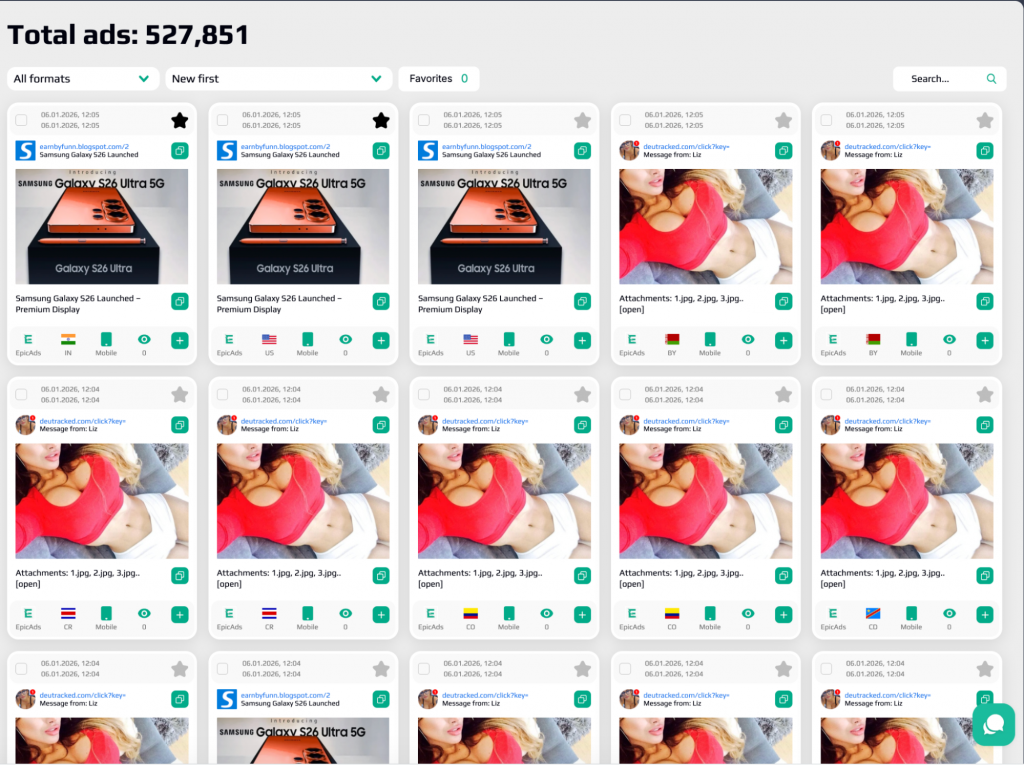
Note: A Push creative can be imported into an InPage campaign (the large image is simply dropped), but InPage cannot be imported into Push. All imported creatives go through moderation just like your own ads.
Step 3. Match a 3SNET Offer to the Right EpicAds Format
EpicAds has only three formats, and that’s intentional. Each is tailored to a specific type of 3SNET offer and GEO. Choose the combination deliberately rather than blasting everything with a single format.
| EpicAds Format | Best for | Best combinations with 3SNET offers |
| Web Push | Warm, subscribed audience; high CTR; strong on desktop and Android | Casino/betting RevShare or CPA in GEOs with large subscriber bases: BR, IN, ZA. Works well where a bit of trust is needed before the deposit. |
| InPage | No opt‑in required; works on iOS; all browsers; high mobile volume | Short funnels and SOI/CPL flows in ID, BD, US. Essential when you need iOS reach that classic Push doesn’t provide. |
| OnClick (Pop) | Maximum volume, lowest CPC; aggressive format | High‑volume CPA testing in PK, MX, VN with a strong pre‑lander that does the presale. Ideal for cheap and fast data. |
How to interpret this in practice: Push and InPage deliver results through strong creatives and warmer user intent, while OnClick performs best with a solid pre‑lander and high volume. Consult your 3SNET manager to identify which offers in your GEO convert most effectively on push and pop traffic. With visibility into postback data across multiple partners, they can recommend the offers most likely to generate payouts. Before you launch, take a look at the full list of 3SNET affiliate programs to pick the model (RevShare, CPA, or Hybrid) that best fits your funnel.

If you don’t want to manually match offers to each GEO from the start, run your first tests through the 3SNET smartlink. It automatically routes each click to the best‑performing offer based on GEO and device, which is convenient while you’re still learning the traffic. Switch to direct offers once you identify which GEO and format combination is driving ROI. That’s when you can optimize a specific funnel rather than a black box.
3SNET Offers for Top EpicAds GEOs
India
One of the largest markets for testing gambling and betting offers. Android traffic performs best, particularly Web Push and OnClick. Separate campaigns for gambling and betting.
CPA:
RS:
Brazil
The largest iGaming market in Latin America. Web Push delivers high CTR, while OnClick provides the volume needed for quick testing.
CPA:
RS:
Indonesia
Formats: OnClick (Pop) Android, In-Page. Suitable for both simple mobile funnels and more creative mechanics.
Bangladesh
Format: Web Push Mobile. Small starting budgets, short landing pages, sports‑themed creatives.
Pakistan
Format: OnClick (Pop) Android. A separate campaign for each offer, simple funnels.
Mexico
Format: OnClick (Pop) Mobile. Campaigns around sporting events work well, with strict budget control.
Step 4. Connect Both Accounts
You’ll need active accounts on both sides.
EpicAds: register at epicads.net and select the Advertiser role. Note that EpicAds uses a single account for both roles. A toggle in the upper left corner switches between Advertiser and Publisher, so if you have your own sites, you can monetize them later under the same login. Fund your balance to get started (minimum deposit is $50; a reasonable first test budget is $50–100). Payment methods include crypto (USDT TRC‑20), Capitalist USD, and PayPal. Card payments are being rolled out.
3SNET: apply at 3snet.co and provide detailed information about your traffic sources and verticals. This speeds up approval. Once you’re in, grab your offers or smartlink and message your manager to confirm GEOs and set up postbacks.

Step 5. Tracking: Macros and Postbacks
Set this up correctly once, and every subsequent optimization decision will be based on reliable data.
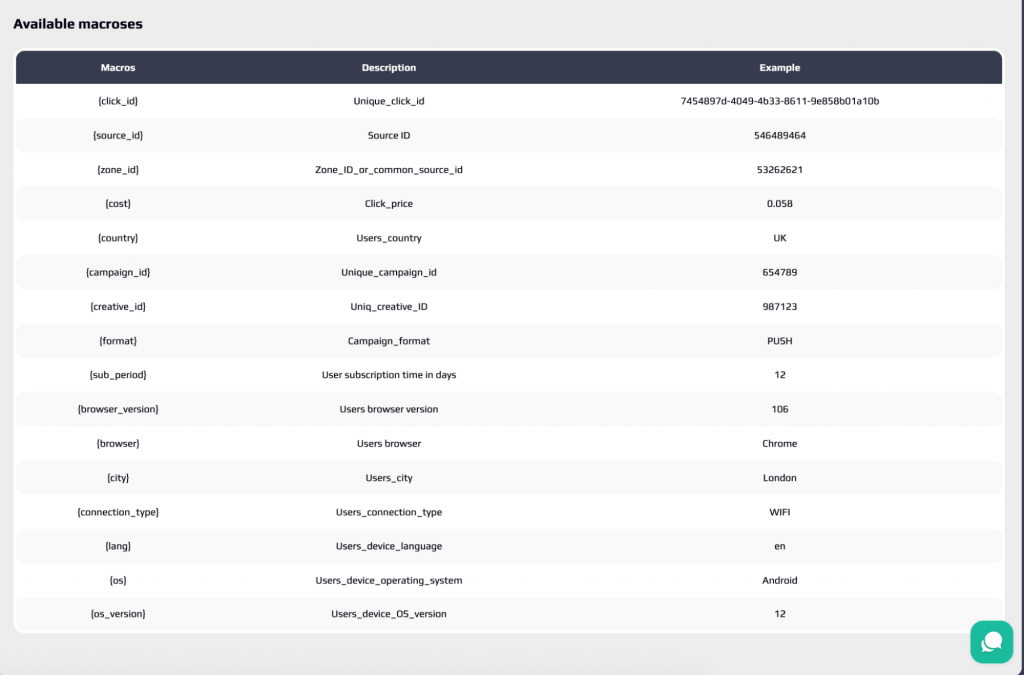
Take your 3SNET tracking link and add EpicAds macros to it. This way, each click reports the source, zone, GEO, and device it came from. Key point: pass {click_id} into sub1 on the 3SNET side. This is the thread that links an EpicAds click to a 3SNET conversion.
Example URL:
https://your-3snet-link.com/?sub1={click_id}&sub2={source_id}&sub3={zone_id}&sub4={country}&sub5={format}&sub6={os}&cost={cost}
Macros worth knowing:
| Macro | What it passes |
| {click_id} | Unique click ID → pass as sub1 |
| {source_id} | Site / source ID (your main optimization lever) |
| {zone_id} | Specific placement / zone |
| {cost} | Actual cost per click in USD |
| {campaign_id} / {creative_id} | Campaign ID and creative ID |
| {format} | Push / In-Page / OnClick |
| {country} / {city} | GEO down to city level |
| {os} / {os_version} | OS and version |
| {browser} / {browser_version} | Browser and version |
| {connection_type} | Mobile / WiFi |
| {lang} | Browser language |
On the 3SNET side, set up postbacks for key events (registration, deposit, and qualification) passing the same click_id back. EpicAds integrates with popular trackers (Keitaro, Binom, Voluum, RedTrack, BeMob, PeerClick, AdsBridge, and others). In the Tracking section, you can generate a ready‑to‑use S2S postback string. Confirm the exact format with your manager.
About payouts, without illusions: in most iGaming offers, you get paid not for the deposit itself, but for qualification, which happens after the player meets the wagering or KPI requirements. Calculate your break‑even point based on that, not on the number of deposits. Otherwise, a campaign that looks profitable at first glance may tell a very different story when you run the numbers.
Step 6. Build a Campaign the EpicAds Way
Now it’s time to create a campaign in EpicAds. These are the settings that actually affect results:
Bid (CPC): start with the recommended CPC from the Volumes of Traffic tool. A lower bid will cut your delivery. Raise it if you want more auction volume.
Targeting: GEO (down to city level), device, OS, browser, connection type, language, and schedule by day or hour. The platform operates on UTC+3. Set your dayparting accordingly, not based on your own time zone.
Separate desktop and mobile from the start. They behave differently and should be bid on and optimized independently.
Budget: minimum $10/day. Cap the test with a total budget (e.g., $100) to avoid overspending overnight.
Creatives: title up to 30 characters, description up to 40, icon 192×192, optional large image 492×382. This is where your Epic Spy research turns into real ads: localized copy, the actual offer bonus in the title, and 2–3 variations to test.


Moderation is usually quick: often around 30 minutes during business hours. The network is known for its iGaming‑friendly moderation across verticals like dating, nutra, and adult, so approvals rarely get stuck.
Step 7. Analyze Performance and Eliminate Inefficiencies
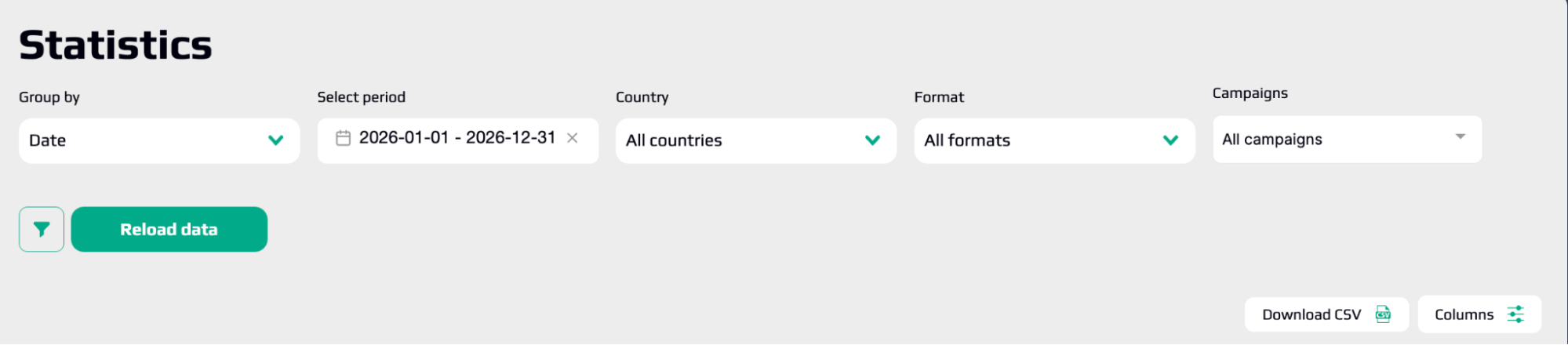
Once clicks start coming in, EpicAds and 3SNET give you two halves of the picture. EpicAds shows the spend side: impressions, clicks, CTR, CPC/win rate, spend, and performance by sources and zones. 3SNET shows the money side: clicks, conversions, EPC, revenue, and CR%. The goal is to match them by click_id and identify where spend is outpacing revenue.
Optimization cycle:
- After 100–200 clicks with no conversions from a source or zone, add it to your blacklist via Audiences (lists can be built by Source ID, IP, or Subscription ID).
- Use micro‑bidding to increase bids on converting sources and lower them on weak ones, rather than adjusting the entire campaign’s bid.
- Keep ROI = (Revenue − Spend) / Spend × 100% in focus, but monitor CPL and EPC alongside it to catch a slipping source before it shows up in ROI.
- Rotate creatives on a schedule. Push and pop ads burn out fast, and Epic Spy is always there for the next batch.
Step 8. Scale What Actually Drives ROI
Scaling on EpicAds is mostly about expanding winners without breaking them:
- Duplicate the winning GEO + format combination and expand into neighboring GEOs with a similar profile, rather than pushing a single campaign’s budget to the ceiling.
- Build a whitelist of proven sources and launch a separate campaign that buys exclusively from them.
- Continuously A/B test new creatives to keep your winning campaign from dying of burnout.
- Keep test budgets small ($50–100). Only funnel budget into a combination after it shows positive ROI based on qualifications, not just deposits.
How to Start
- Open the Volumes of Traffic tool and select a GEO + format combination with real depth and a CPC that works for your offer.
- Pull creatives from Epic Spy for that GEO / vertical.
- Register at epicads.net (Advertiser role) and 3snet.co. Get offer recommendations from your manager.
- Set up tracking: pass {click_id} → sub1, and configure postback for qualification.
- Launch a test with $50–100. Separate desktop and mobile, and bid at the recommended CPC.
- Cut dead sources in Audiences, micro‑bid on winners, and scale based on ROI.
Bonus for 3SNET Partners
When working with EpicAds through 3SNET, you get +10% on your first deposit. Apply promo code 3SNET when funding your account and put that extra budget straight into GEO testing. On a $100 test budget, that’s an extra $10 in spend. It’s not a game‑changer, but it’s exactly the kind of buffer that often makes the difference between seeing a combination through to its first qualifications and cutting it off halfway.
How to Drive Traffic to 3SNET iGaming Offers via EpicAds: A Complete Setup Guide
The EpicAds + 3SNET combination delivers results not because of some hidden trick, but because each platform solves a specific part of the puzzle. EpicAds brings affordable volume in Tier 2 and Tier 3 markets, integrated spy tools, and competitive CPC. 3SNET provides offers built for those same GEOs, backed by a manager who knows what actually converts.
The rest is discipline. Plan with the Volumes of Traffic tool, not by guessing. Separate desktop and mobile from day one. Pass {click_id} into sub1 from the very start. Otherwise, there will be nothing to optimize. And calculate your break‑even point based on qualifications, not deposits. That’s the only number that will match your final reconciliation.
A first test of $50–100 won’t turn you into a millionaire overnight. What it will do is give you actionable data: which sources are worth keeping, which creatives resonate, and where CPC doesn’t align with the payout. From there, success comes down to one thing: how quickly you cut the dead weight and scale what actually works.
Open the Volumes of Traffic tool and pick your first GEO. Everything else is a matter of iteration.